Featured Newsjacking notifies you by Slack or email when news breaks on the keywords you follow, lists the relevant stories with a suggested angle for each, and finds the journalists, podcasts, speaking opportunities and HARO requests you can pitch while the story is still developing.
This guide walks through setting it up from a blank account to your first pitch, and then through running it for several clients at once.
Before you start, have ready:
- A Featured.com account
- Who you're newsjacking for: name, company, website, job title and LinkedIn
- Three to eight keywords you could credibly comment on
- A Slack channel, or the email address on your account
Step 1: Choose your expertise and beats
This is the step that decides whether Newsjacking is useful or noisy, so it is worth five minutes of thought.
Good beats are the subjects of stories you can credibly comment on:
- Cybersecurity consultant: "data breach," "ransomware," and the names of two or three major software vendors.
- Mortgage broker: "Federal Reserve," "mortgage rates" and "housing market."
Add your competitors and the biggest companies in your category. When a competitor makes news, reporters often want an outside voice from the same industry, and that voice can be you.
Step 2: Start the workflow in Featured
Log in to Featured.com, click Add new workflow and choose Newsjacking.
First, decide who the workflow is for: a client, or your company or you. Adding the name, company, company URL, job title and LinkedIn URL gives the tool context on which stories you'd be a good fit for.
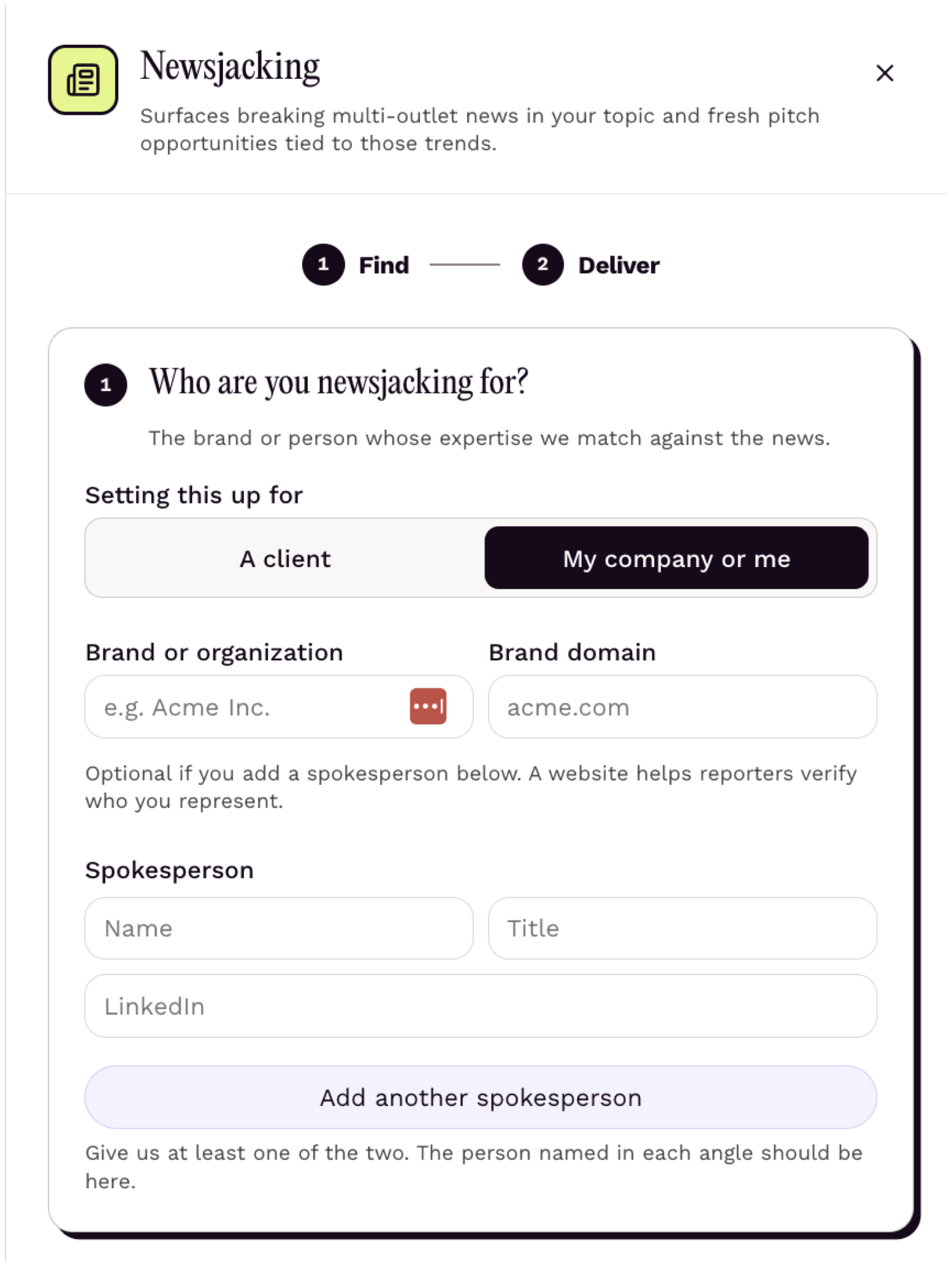
If you represent several clients, set up a separate workflow for each one, so every client gets alerts, angles and off-limits topics specific to their business. Step 8 covers that setup in detail.
Step 3: Specify your keywords and filters
Enter your expertise, the beats you want to discuss, the markets you serve and any off-limits topics. You can also choose which countries to monitor.
Be as specific as possible, and skip keywords too broad to act on. "Technology" or "health" will return hundreds of stories a day, and you will stop reading the alerts.
Markets you serve is what turns a national story into a local pitch. A Scottsdale real estate brokerage that adds Phoenix and Scottsdale will see a national housing story come back with a local angle, such as what the latest existing-home sales figures mean for buyers in the East Valley. That's the angle a Phoenix business reporter can actually use.
Each workflow monitors one language, so a client who needs coverage in English and Spanish needs two workflows.
Step 4: Choose where and how often you want alerts
Featured asks where to send alerts: Slack or email.
- Slack: Featured walks you through connecting your workspace and picking a channel. A dedicated channel such as #newsjacking keeps alerts from getting lost in general chatter and makes it easy for a team to see who is taking which story. If you run workflows for several clients, give each one its own channel, such as #newsjacking-acme.
- Email: alerts go to the address on your account.
Then choose a schedule. Daily is the right default for most people. Weekly works for slower industries, and a custom schedule lets you check in more often during a busy news period such as earnings season or a regulatory deadline.
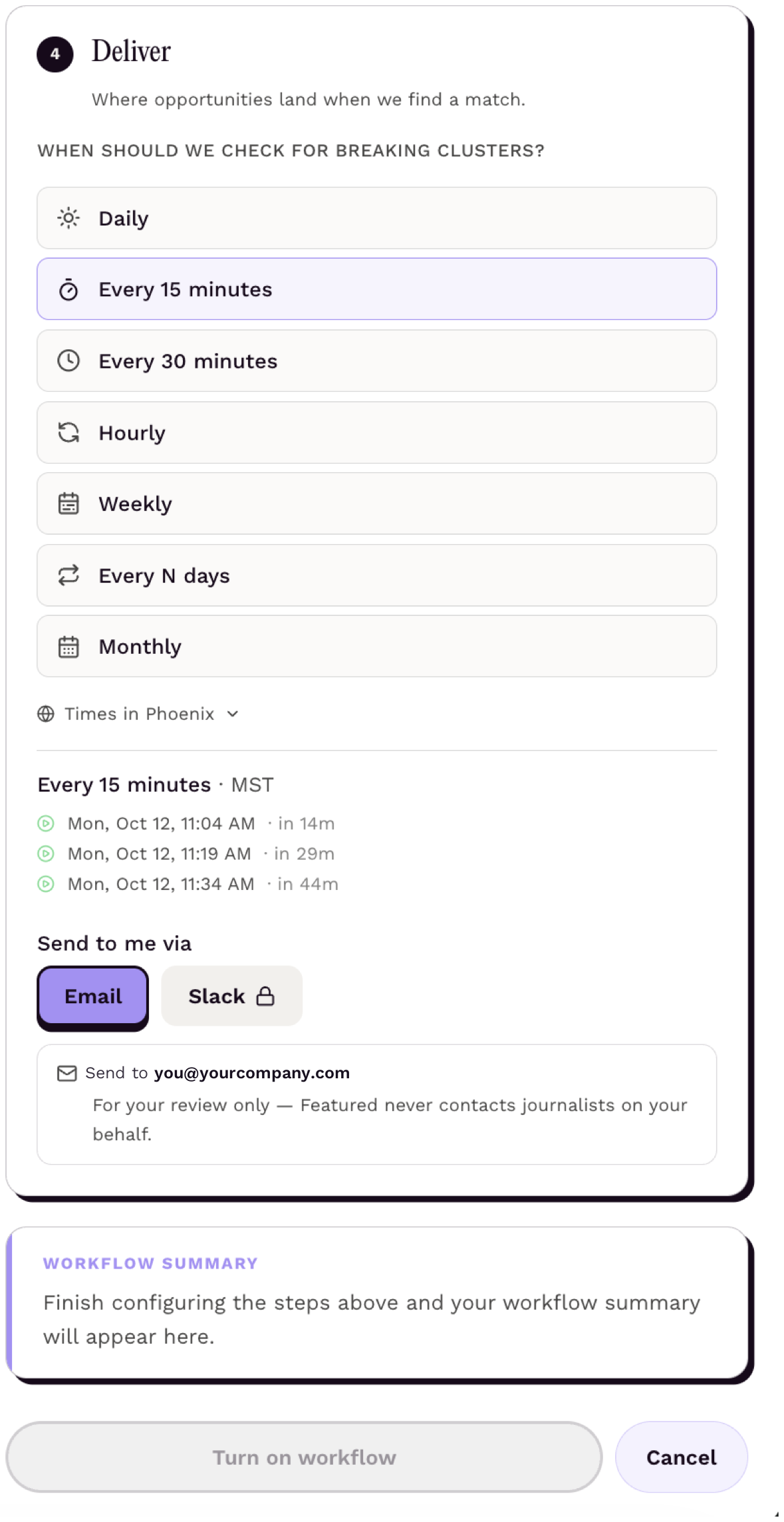
Free accounts receive stories and suggested angles on the schedule you set; paid plans add more daily usage for teams running several workflows.
Step 5: Read your first alert
When news breaks on one of your keywords, the alert arrives with a list of relevant stories. Each story comes with a suggested angle: the specific take an expert in your field could add to that story.
Read the angle before you read the story. If the angle is something you could speak to with authority, the story is worth your time. If not, skip it. The fastest newsjackers are the ones who say no quickly.
Step 6: Click "Find newsjacking opportunities"
This is where Newsjacking differs from a news alert. Click Find newsjacking opportunities on a story and Featured populates the places you can take your angle:
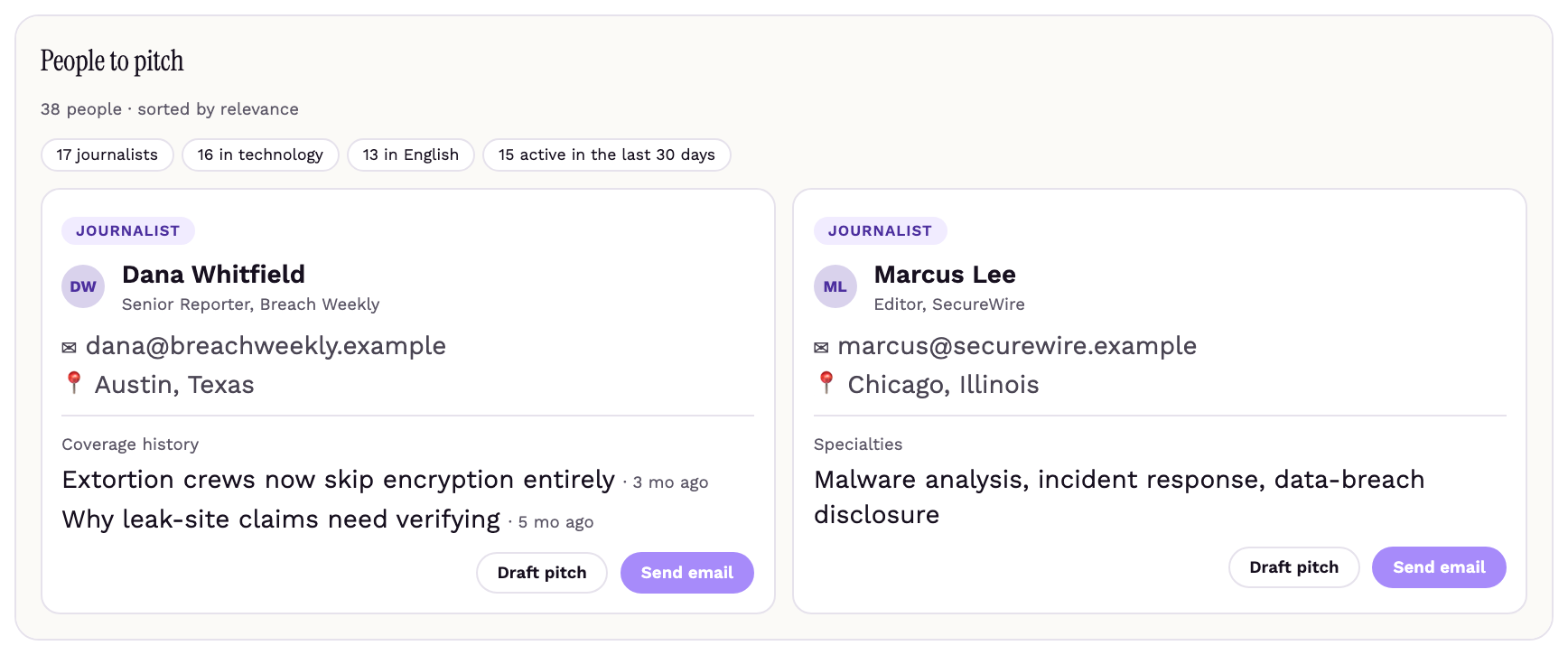
- Journalists to pitch: reporters who write on that beat and are likely to cover the story.
- Journalist requests: open HARO requests related to the breaking news.
- Media opportunities: publications and bylined article opportunities relevant to the story.
- Podcast opportunities: shows that cover the topic and book expert guests.
- Speaking opportunities: events and panels on the subject.
In a test run on a cybersecurity workflow, one ransomware story returned 17 journalists who cover breaches and 21 podcasts on the topic, along with one open journalist request.
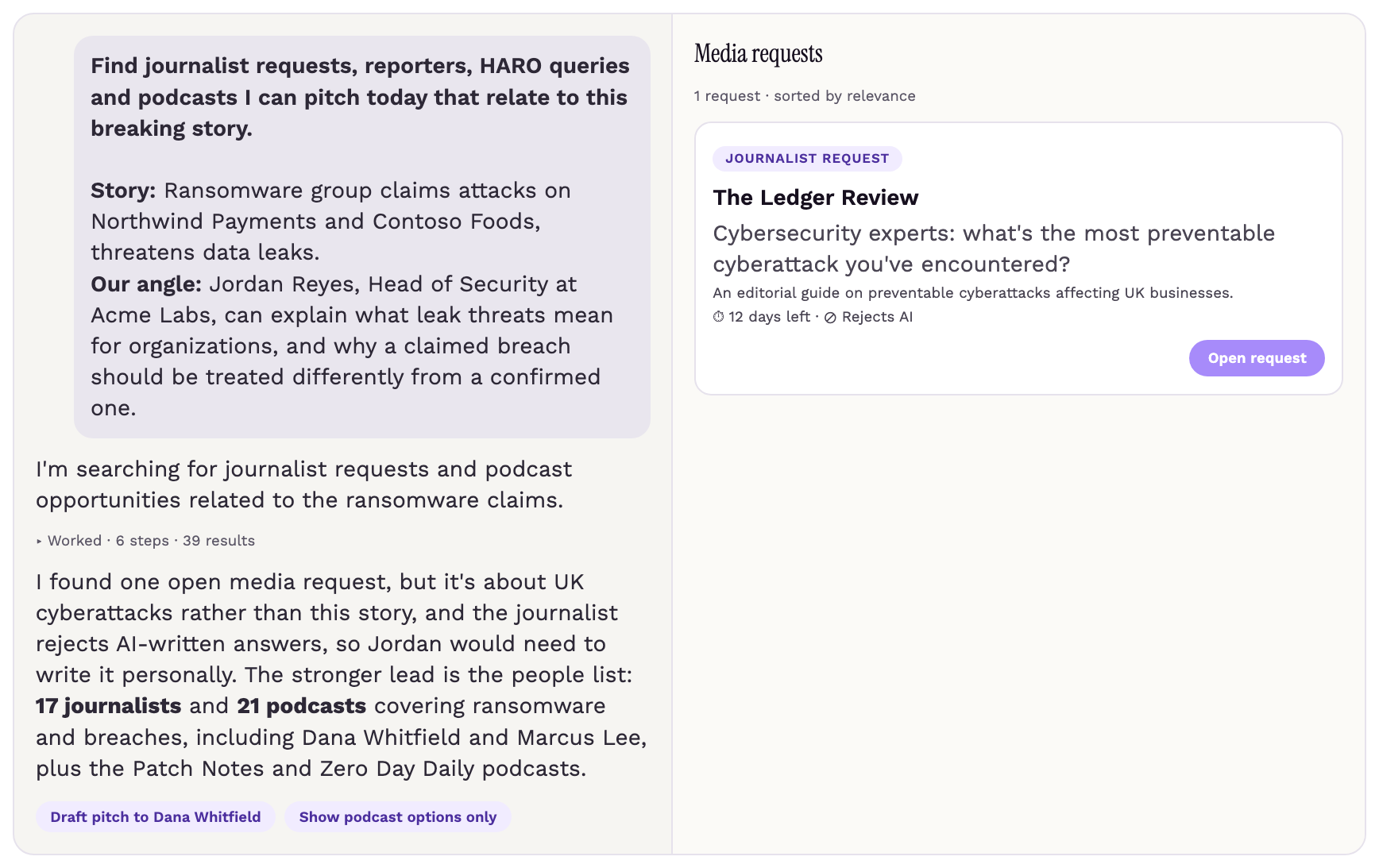
Check the journalist requests first, and confirm each one matches the story. A reporter who has already posted a HARO request about the story is actively looking for a source, so a good response there has the highest chance of landing.
The match isn't automatic, though. In the test run, the chat itself flagged that the only open request was broader than the ransomware story, and a pitch tied to that story would have missed what the reporter was asking for.
Step 7: Draft and send your pitch
Select an opportunity and Featured drafts a response with the story and your angle already assembled as context. Edit it so it sounds like you, add a specific number, example or prediction that only you could offer, and send.
A few rules hold for every newsjacking pitch:
- Keep it under 150 words. The reporter is on deadline.
- Lead with the story and your angle, not your bio.
- Include a quote the reporter could use without editing.
- Offer to talk by phone within the hour.
- Send it the same day the alert arrives.
Step 8: Running newsjacking for multiple clients
An agency or in-house team running newsjacking for several clients or spokespeople needs a structure that keeps each client's profile, spokesperson expertise and geographic focus separate, with a person reviewing every alert before a pitch goes out. Five settings do most of the work.
| Setting | Why it matters |
|---|---|
| One workflow per client, with every spokesperson added | Set each workflow up on behalf of the client and add each spokesperson's name, title and expertise, so every suggested angle names the right person to deliver it. |
| The client's cities under Markets you serve, plus its off-limits topics | A regional bank gets its metro areas; a national brand gets the markets where it has a local presence. Off-limits topics keep a client from being pitched on a competitor's layoffs or a lawsuit it would rather not discuss. |
| A Slack channel per client, with one person triaging | Alerts for different clients never land in the same feed. One owner reads every channel at the same times each day, routes stories to the right spokesperson and closes the ones not worth pursuing. |
| A short list of pre-approved topics per client | With a pre-approved topic and a pre-approved paragraph per spokesperson, a quote can go out the same day without a new round of client sign-off. |
| Pro+ once the agency runs many active workflows | Workflows draw from a daily usage pool, so a team with many active workflows will hit the Pro limit. Pro+ raises it so alerts don't queue during a busy news day. |
The workflow does the finding. A person still decides which client speaks, on which stories, and in what words.
Step 9: Tune the workflow after the first week
After a week of alerts, revisit your keywords. Remove any keyword that produced stories you never acted on, and add any you found yourself wishing you'd been tracking. Most people start with three to eight keywords and settle on five to ten within a month.
For a team running several client workflows, add a weekly review of which keywords produced pitches, which produced noise, and which clients went a week without a usable story. A client with no usable stories usually needs broader beats or more competitors added, not more keywords of the same kind.
Start newsjacking with Featured
Newsjacking works best when speed and relevance come together. With the right keywords, a focused alert schedule and a clear process for turning breaking stories into pitches, you spend less time searching for opportunities and more time responding to the ones that fit your expertise, or your client's.
Featured's Newsjacking workflow brings that process into one place, from monitoring the news to finding relevant journalists and opportunities to helping you shape your pitch, and it scales to a workflow per client without the alerts running together.
Set up your Newsjacking workflow in Featured and start finding relevant stories, journalists and pitching opportunities today.
FAQs
How is this different from Google Alerts?
Google Alerts tells you a story exists. Featured's Newsjacking tells you the story, the angle you could take, and the journalists, requests, podcasts and events where you can take it.
Can I run it without a paid plan?
Yes. Free accounts receive relevant news stories and suggested angles by email or Slack on the schedule you set. Paid plans add more daily usage, which matters once you are running several workflows.
Does it include HARO requests?
Yes. Featured, which owns and operates HARO, surfaces the open HARO requests tied to the breaking story alongside the journalists who cover it. Check that each request actually matches the story before you respond, since a request on the broader topic is not the same as a request about the story that just broke.
How many keywords should I track?
Start with three to eight and adjust after a week. Most people settle on five to ten within a month.
Can I run newsjacking for more than one client?
Yes. Set up one workflow per client, add each client's spokespeople, markets and off-limits topics, and route each workflow's alerts to its own Slack channel. Step 8 walks through the setup.
Connecting Experts with Publishers
Connectively connects subject-matter experts with top publishers to increase their exposure and create quality, ready-to-publish Q & A content.
About Connectively →