

A GEO audit measures how AI search engines describe, recommend, and cite your brand. It shows where your brand appears in AI-generated answers, where it is missing, which competitors appear instead, and which sources influence those answers.
GEO stands for Generative Engine Optimization, the practice of improving how AI assistants describe, recommend, and cite a brand.
Traditional SEO focuses on where your website ranks in search results. GEO focuses on whether your brand appears inside the AI-generated answer and what information AI assistants use to construct that answer.
Featured’s GEO Audit lets marketing, SEO, and PR teams measure this visibility across ChatGPT, Claude, Perplexity, and Gemini. It then identifies the sources behind AI answers and helps turn those findings into earned-media opportunities.
Here is how to run a GEO audit through Featured and use the results to improve your AI search visibility.
What Does a GEO Audit Measure?
A GEO audit should answer five core questions:
- Where does my brand appear in AI search results?
- Where is my brand missing?
- Which competitors appear instead?
- Which sources influence AI answers?
- What can I do to improve my visibility?
Featured’s GEO Audit measures these areas by running relevant prompts across four major AI assistants and identifying the sources behind their answers.
How to Run a GEO Audit on Featured
Featured’s GEO Audit starts with a simple request. From Featured, ask the AI co-pilot to run a GEO audit on your company website.
Step 1: Run a GEO Audit on Your Company
To start your audit, type:
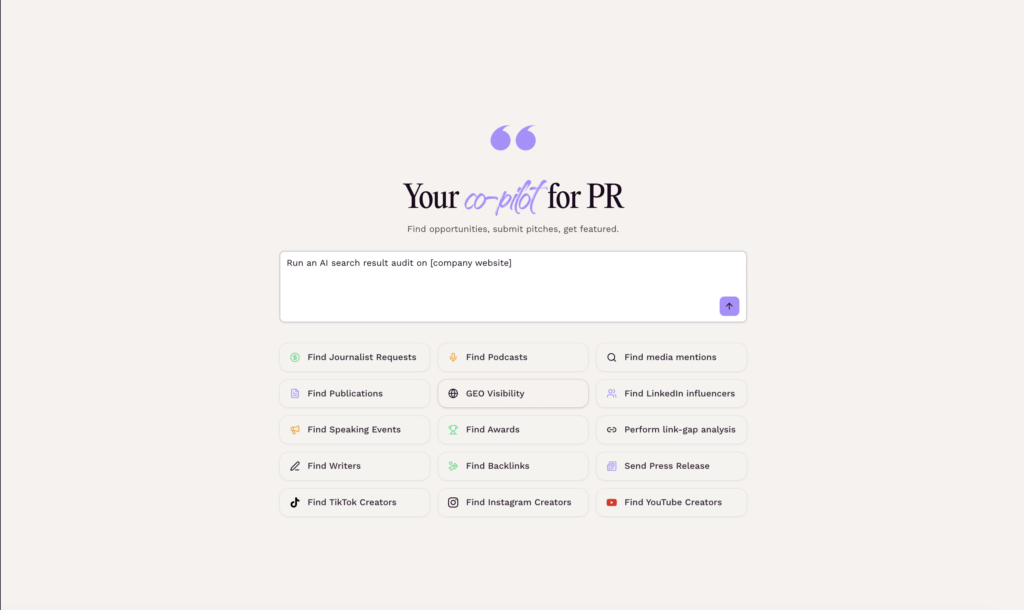
Featured uses your company website and category information to generate the prompts used in the audit. The generated prompts are designed to reflect how potential buyers might search for tools or services in your category.
Step 2: Confirm Your Company Information
Before running the scan, Featured shows you the information it has identified about your business, including your company summary, business category, and competitors.
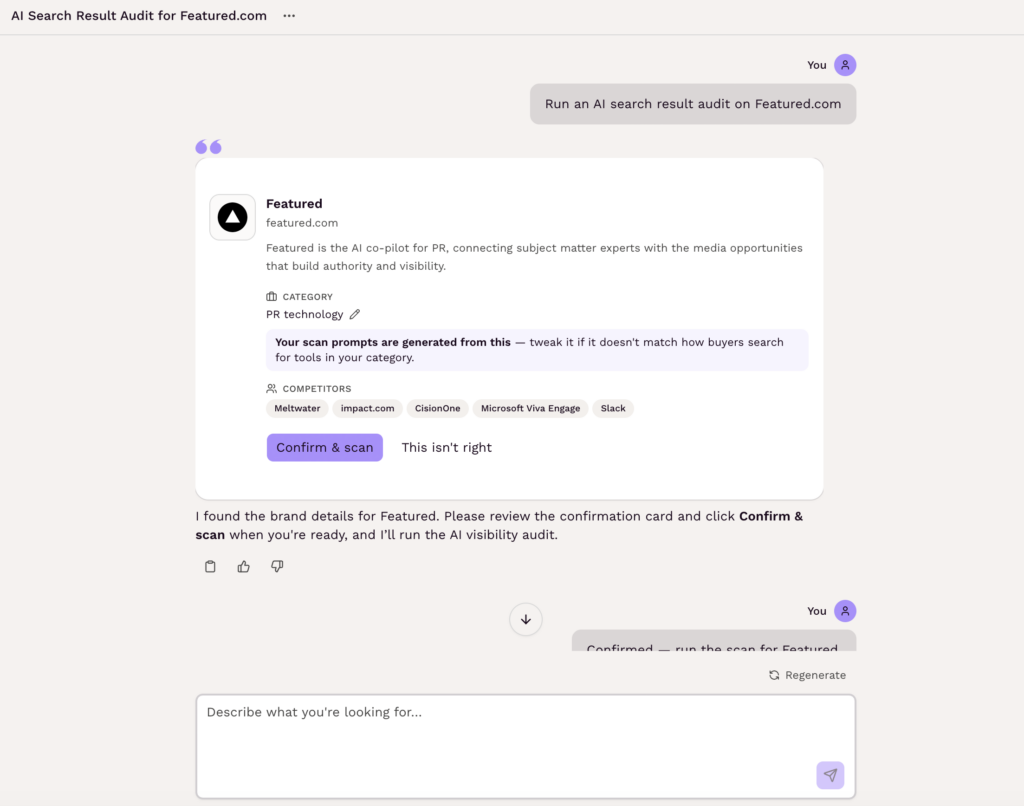
Review this information to make sure Featured has correctly understood your business.
The business category is the only field you can edit at this stage. If Featured has placed your company in the wrong category, update the category so the audit reflects how buyers actually search for products or services in your market.
Getting the category right matters because Featured uses it to generate search prompts that reflect how buyers might search for products or services in your market.
Once the information is correct, confirm the brand details.
Step 3: Review Your GEO Audit Report
After you confirm the brand details, Featured runs the audit. The report typically takes a few seconds to generate.
The results appear in a panel on the right side of the Featured interface.
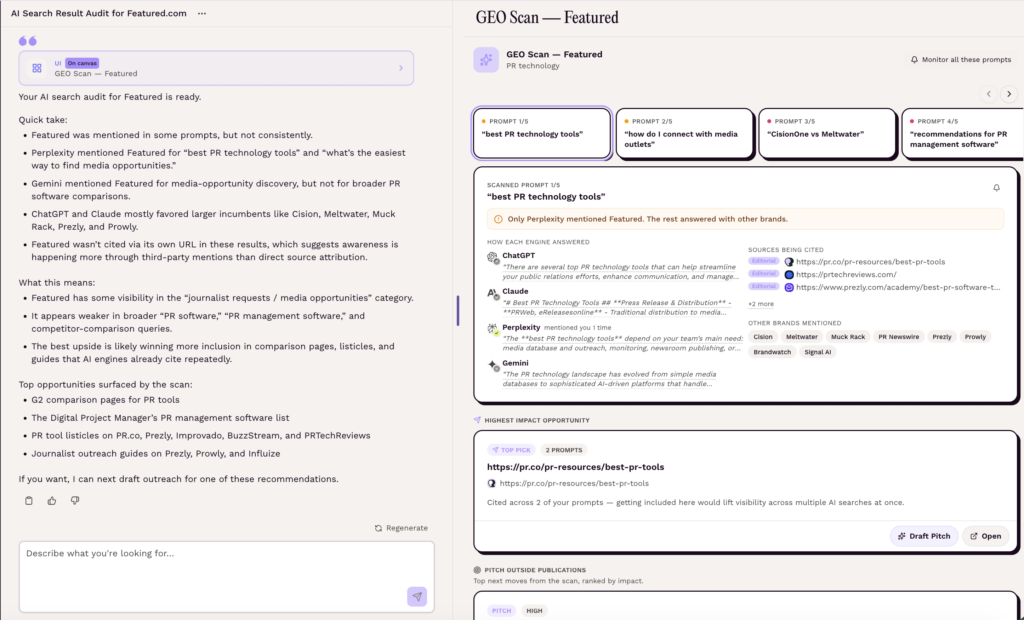
The report typically contains five search prompts generated for your business.
For each prompt, you can see information including:
- Whether your brand appears in the AI answer
- Whether your website is used as a source
- How each AI model answered the prompt
- Which AI models included your brand
- Which sources the AI models cited
- Which competitors were mentioned
This gives you a snapshot of how AI models represent your brand for the types of questions potential customers may ask.
Check whether your brand appears
Start by looking at whether your brand appears in each AI answer.
The report shows which AI models included your brand. This can reveal whether your visibility is consistent across AI models or whether some models mention your company while others do not.
This matters because AI visibility gaps appear to be widespread. According to the Featured AI Citation Report, June-August 2026, 78.5% of audited brands were not mentioned in any buying question tested, while 92.6% of audited brands never had their own site cited. These findings show why an AI visibility audit is important: even brands that are well established online may be missing from the answers potential customers see.
If your brand is missing from a prompt that is highly relevant to your business, that is a potential AI visibility gap.
See how AI models describe your brand
Look at the actual answers generated for each prompt.
Different AI models may describe your company differently or emphasize different products, services, or attributes. Reviewing these answers can help you understand how AI currently represents your brand to potential customers.
This can also surface inaccurate or incomplete descriptions that your team may want to address.
Identify which competitors appear instead
The audit shows the competitors mentioned in the AI answers.
If your brand is absent from a prompt, look at which competitors appear instead. These may not be the same competitors you track in traditional SEO.
A company can rank below you in Google but still appear in an AI answer because the AI model is drawing information from different sources.
This makes competitor visibility an important part of a GEO audit. You are not just asking, “Who ranks above us?” You are asking, “Who does AI recommend when our brand is not included?”
Analyze the sources AI models cite
The audit also shows the sources being cited for each prompt.
Look for publications, websites, and articles that appear repeatedly across the five prompts. These sources can help explain what information is influencing AI answers about your category.
For example, if the same industry publication is cited across several relevant prompts, that publication may be an important source of AI visibility in your category.
Featured’s GEO Audit also shows whether your own website was used as a source.
If your website is cited but your brand is not mentioned in the answer, you may have a content gap rather than a pure lack-of-coverage problem. Your content is providing information to the AI model, but your brand is not necessarily being surfaced as part of the answer.
Look for patterns across the five prompts
Do not treat each AI answer as an isolated result.
Look across all five prompts and ask:
- Does your brand consistently appear?
- Which competitors appear repeatedly?
- Which publications are cited repeatedly?
- Which AI models include your brand most often?
- Is your website being cited?
- Are there important prompts where your brand is consistently missing?
These patterns give you a clearer picture of your AI search visibility and help you decide where to focus your efforts.
Step 4: Turn Publication Recommendations Into PR Pitches
Below the GEO Audit results, Featured provides a ranked list of publication recommendations.
These recommendations are based on the publications and websites being cited for the five search prompts generated for your business. Featured highlights higher-impact opportunities and shows when a publication has been sourced for multiple prompts.
If a publication repeatedly appears as a source for relevant AI searches, it may be worth pursuing as a PR target.
Each recommendation includes an option to draft a pitch.
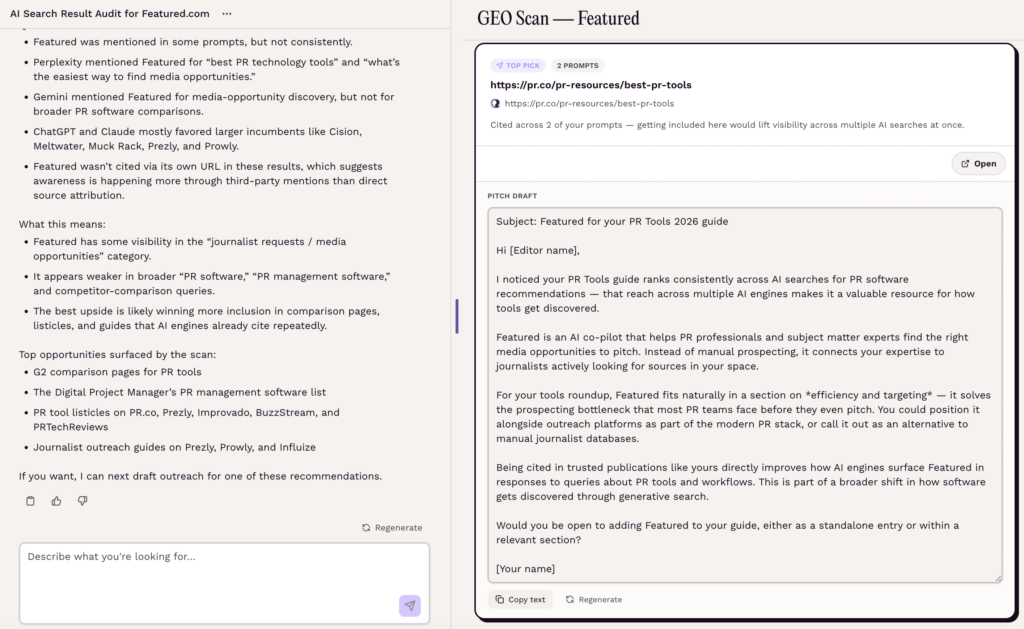
When you select the draft pitch option, Featured generates a pitch for that publication using relevant context from your conversation and GEO Audit.
This gives you a way to move directly from AI visibility research to PR outreach.
Instead of cold pitching publications based only on a general media list, you can prioritize publications that are already being cited for questions relevant to your business.
Step 5: Find Live Media Opportunities Related to Your GEO Audit
Once you identify relevant publications and prompt topics, you can look for media opportunities directly in Featured.
Return to the main Featured chat and type:
“Find media opportunities from [publication]” or “Find media opportunities related to my GEO audit prompts”
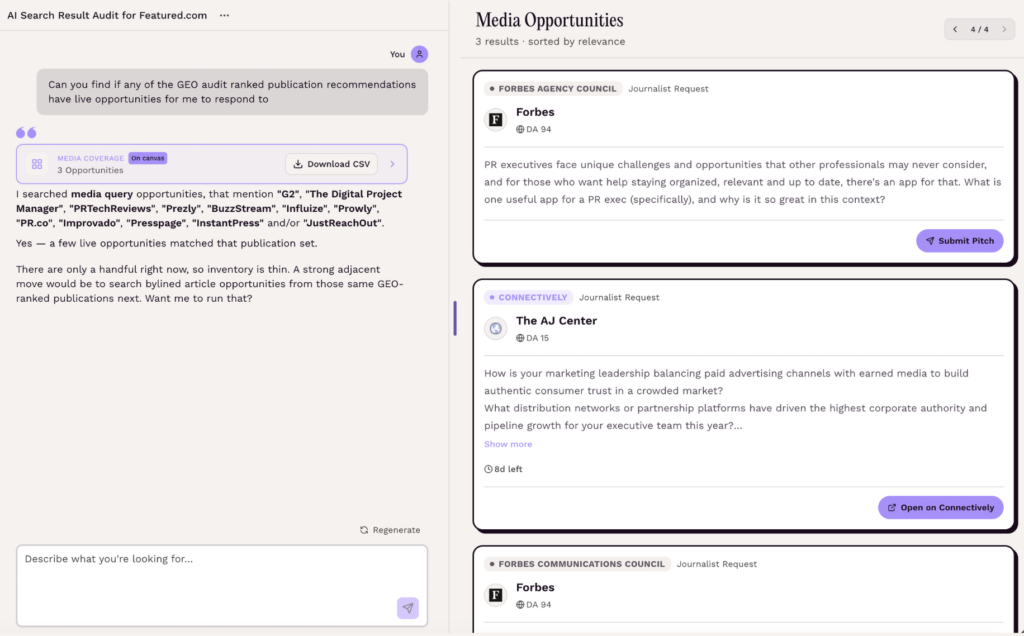
Featured can surface journalist requests and bylined article opportunities related to the topics and expertise identified in your GEO Audit.
These opportunities are not limited to the publications recommended in your audit. Instead, they help you find live media opportunities related to the same topics your AI visibility research uncovered.
This gives you another way to turn GEO Audit findings into earned media, rather than relying solely on cold outreach.
Step 6: Identify Content Gaps
Your GEO audit can also reveal cases where an AI search engine cites your website as a source but does not mention your brand in its answer.
This can point to an opportunity to improve existing content rather than pursue new coverage. Review the cited page and consider whether it clearly communicates your company’s expertise, products, services, and relevance to the topic.
Ask:
- Does the page clearly explain your company’s expertise?
- Is the information current and accurate?
- Does the content clearly connect your company to the topic?
- Does it answer the question a potential customer is asking?
Use the findings from your audit to decide whether your next step should be updating content, addressing competitive gaps, or pursuing relevant media opportunities.
Improve AI Search Visibility With GEO Audits
A GEO audit gives SEO, marketing, and PR teams a way to understand how AI models currently represent their brand.
With Featured, you can:
- Run a GEO Audit on your company.
- Confirm your company information and category.
- Interpret your AI visibility, competitors, answers, and cited sources.
- Identify publications influencing AI answers and turn them into targeted PR pitches.
- Find live journalist requests and bylined opportunities from those publications.
- Address content gaps where your website is being cited without generating brand visibility.
AI search is still evolving, but brands do not have to treat their visibility in AI answers as a black box. A GEO audit gives you a practical way to measure AI search visibility, identify the sources and competitors influencing AI answers, and find opportunities to improve your brand’s presence. With Featured, those findings can inform both your content strategy and your PR outreach.
Frequently Asked Questions
What is a GEO audit?
A GEO (Generative Engine Optimization) audit measures how AI search engines describe, recommend, and cite your brand. It shows where your brand appears in AI-generated answers, where it’s missing, which competitors appear instead, and which sources influence those answers.
How long does a GEO audit take?
Featured’s GEO audit takes just a few seconds to generate. You’ll quickly get a report showing how your brand is represented across leading AI search engines.
Is the GEO audit free?
Free users can run one GEO Audit per day. We recommend running audits monthly to track how your visibility changes over time.
If you need to run multiple audits each month, the Pro Plan gives you more flexibility to monitor and improve your AI visibility.
More details on Featured’s pricing can be found here.
Which AI models are being audited?
Featured’s GEO audit evaluates your brand across four leading AI platforms: ChatGPT, Claude, Perplexity, and Gemini.